
Knowledge Platforms for Teams That Want Knowledge Inside Their Existing Tools (2026)
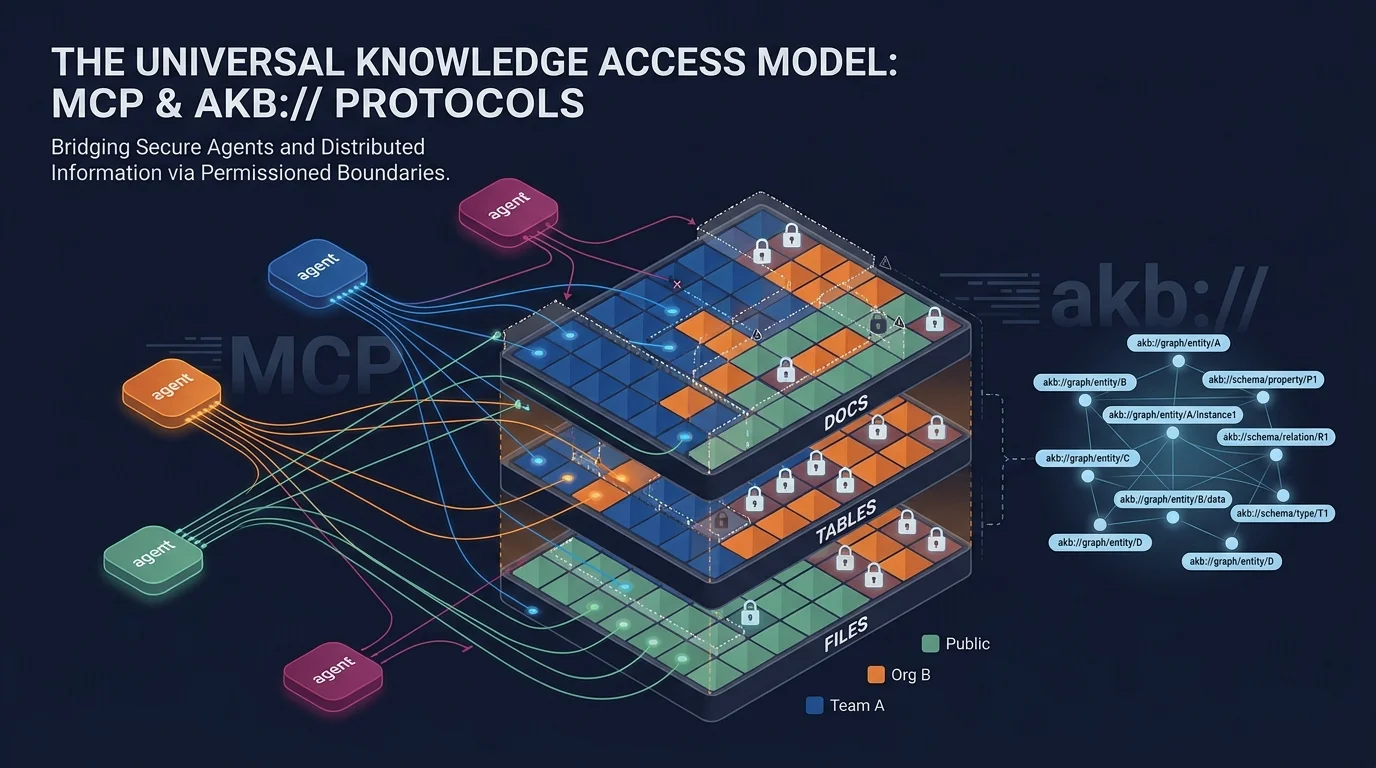
Use AKB from supported MCP assistants or connect internal apps through its API, with shared knowledge governed by individual identities and vault permissions.
Key Takeaways
- Work from supported assistants: MCP-aware clients can query and update AKB knowledge from the assistant your team already uses.
- Share one permissioned knowledge layer: AKB organizes documents, structured tables, and files; custom internal applications can connect through its API.
- Extend access to internal apps: Applications without MCP can use a purpose-built API integration or UI.
MCP-aware coding assistants can retrieve and update shared AKB knowledge in the client people already use. AKB is the permissioned knowledge layer behind that workflow.
Connect from an existing assistant
The current AKB README lists these client options. Connect each person using their own identity; vault permissions determine which knowledge they can access.
| Client or integration | Client capability and transport | Optional workflow plugin |
|---|---|---|
| Claude Code and Claude Desktop | MCP clients; use a supported MCP connection | akb-wiki and akb-sessions are optional plugins, not part of connecting MCP. Plugins are available for Claude Code and Codex. |
| Cursor, Windsurf, Cline, and Continue | Connect through the akb-mcp stdio proxy | MCP connection alone does not capture every coding session. |
| Custom agents | Direct HTTP POST /mcp/ with bearer authentication | Add any workflow-specific capture separately. |
For example, a developer can ask an MCP-aware coding assistant to retrieve a project decision from the team vault, inspect the relevant section, then save an approved update to the appropriate vault. The assistant uses AKB as its shared source of knowledge; the MCP connection does not automatically record every session.
A workplace app without MCP can use the same knowledge through a purpose-built API integration or application UI. AKB does not provide a universal native widget embedded in every existing app.
How AKB stores and retrieves knowledge
New installations use PostgreSQL-native revisions; explicit Bare Git deployments remain supported. AKB stores documents, structured tables, and files, which can be connected through explicit relations.
Hybrid semantic and keyword search helps agents find relevant knowledge. Teams can also use literal search, retrieve specific document sections, and follow explicit relations between knowledge items.
Licensing
AKB is source-available. Check the LICENSE for the deployed version and intended use; commercial terms are required for offering AKB to third parties as a hosted, embedded, or rebranded service.
FAQ
Can we use AKB from our existing coding assistant?
Yes, from the MCP-aware clients listed above. Cursor, Windsurf, Cline, and Continue connect through the akb-mcp stdio proxy; custom agents can connect over HTTP. Each person should use their own identity, and vault permissions determine what they can access.
Does connecting MCP automatically save all sessions?
No. MCP provides access to AKB knowledge tools; it does not capture every session by itself. akb-sessions is an optional workflow plugin for session capture.
Can a workplace app without MCP use the same knowledge?
Yes. A custom internal application can integrate through the API or provide its own UI. AKB does not automatically appear as a native widget in every workplace app.
Explore AKB
Connect AI assistants and applications to a shared, permissioned knowledge layer.