
Self-Hosted Knowledge Bases for AI Agents: Local MCP Access in 2026
Run AKB on your infrastructure, connect an authenticated MCP client, and decide where storage, embedding services, and assistant models operate.
Key Takeaway
- Run the service under your control: Follow the deployment instructions for your selected AKB release and keep the backend and data services on infrastructure you manage.
- Connect an authenticated MCP client: A local stdio proxy carries MCP traffic between the client and AKB backend; it does not make the backend or model calls local by itself.
- Choose where every dependency runs: Database, file and vector storage, embedding endpoint, assistant model, and external tools all affect whether data stays within your network. Self-hosting is not automatically air-gapped.
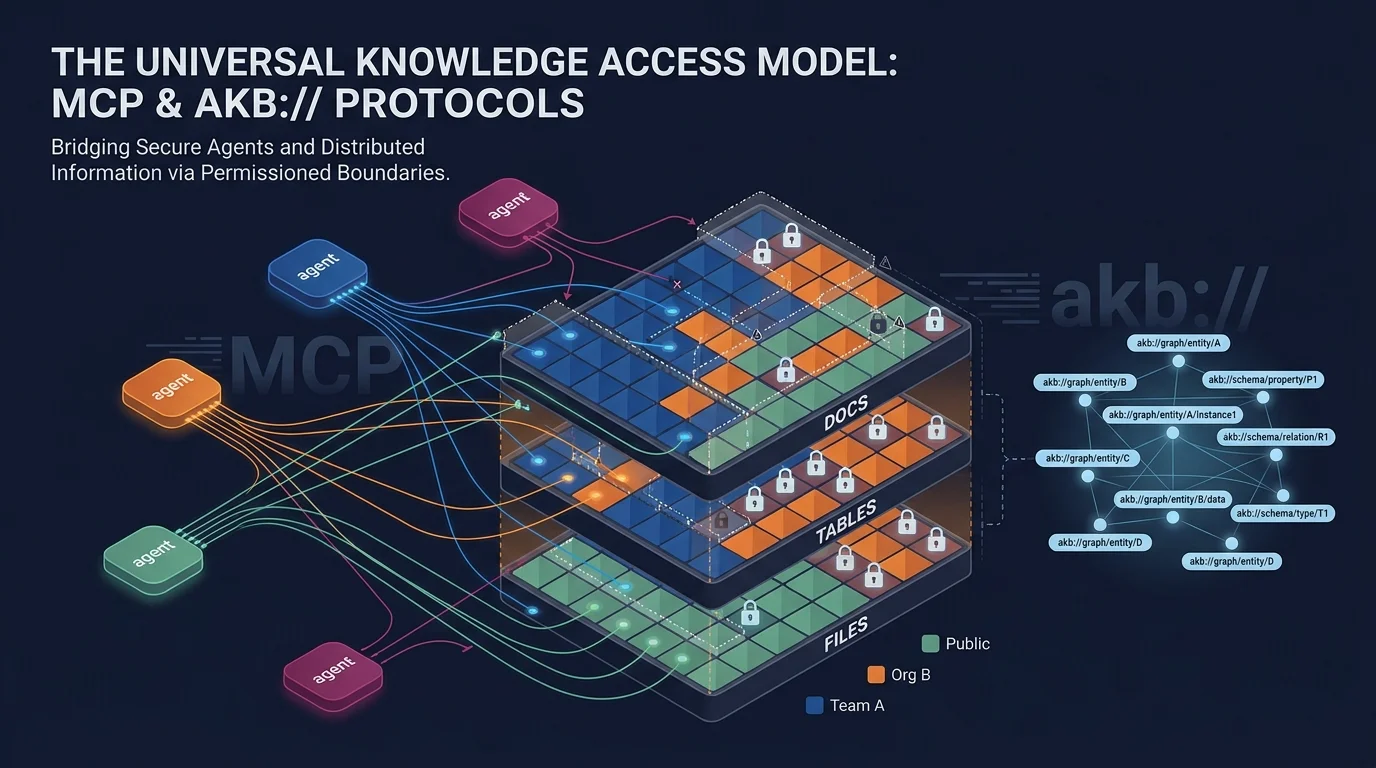
Self-hosted local MCP access means running the AKB service on infrastructure you control and connecting an MCP-compatible agent to its endpoint with that agent’s own credentials. The optional stdio proxy runs alongside the client and connects it to the backend; it is not the backend itself. Your deployment choices also determine where knowledge is stored and where embedding and assistant-model requests go.
Deploy AKB and connect an agent
Use the AKB README deployment instructions for the selected release’s Compose or Kubernetes path. New installations use PostgreSQL Native revisions. The recommended Compose stack includes PostgreSQL with pgvector, MinIO, the API, a separate worker, and frontend, with one-shot services to initialize the installation. Explicit Bare Git installations remain supported; the deployment path depends on the installation and release.
A practical setup sequence is:
- Choose the release, follow its deployment documentation, and initialize persistent configuration, database, and file storage.
- Create individual user identities and deliberately grant access to the vaults each person or agent needs.
- Configure a supported MCP client with the AKB endpoint and that client’s credentials. The default flow uses a Personal Access Token; OAuth is available only when the deployment has enabled that path. Follow the current supported-client instructions in the AKB README. A stdio proxy on the client machine connects to the backend; compatible clients can also use direct HTTP.
- Test an authorized read and write with a non-sensitive note, then confirm the note is available only to the intended users and vaults.
What must stay local?
| Component | To keep it within your network |
|---|---|
| AKB service and revisions | Run the service and its selected revision store on infrastructure you control. New installations use PostgreSQL Native; Bare Git remains an explicit supported option. |
| File and vector storage | Keep PostgreSQL, the S3-compatible file store, and the chosen vector service on approved infrastructure. The recommended Compose stack includes MinIO and pgvector; Qdrant is also supported. |
| Embedding endpoint | Dense search needs an embedding endpoint. With pgvector or Qdrant, unavailable embeddings can leave search operating in BM25-only mode. Use an endpoint you control if embedding requests must stay local. |
| Coding assistant or chat model | AKB hosting does not control the model provider configured in the coding assistant or chat client. Choose a model endpoint within your intended boundary if prompts and context must stay local. |
| External tools | Review the destinations used by any configured tools or integrations, which may connect from the agent’s machine, and restrict outbound access to the endpoints your deployment permits. |
For an offline deployment, keep the required model and embedding services local and test that no configured integration needs outbound access.
Keep personal and shared knowledge separate
Use separate AKB user identities for people or agents that need different access, then grant team-vault permissions deliberately. Running multiple clients against the same backend does not, on its own, share a user’s private notes; sharing credentials would remove that separation. AKB does not automatically curate knowledge or capture every assistant session—those workflows require separately configured tools or consumers.
License
AKB is source-available under the Business Source License 1.1, with conditions on production use. The additional production grant applies to fewer than 100 Named Seats, aggregated as defined in the license; production use at or above that limit, or offering AKB to third parties as a hosted, embedded, or rebranded service, requires a separate commercial license. Contact Dnotitia to discuss commercial terms.
FAQ
Does local MCP mean no data leaves my network?
No. A local stdio proxy only connects the MCP client to the AKB backend. The client’s model provider, embedding endpoint, and external tools may still receive data. Review those endpoints and control outbound network access for the deployment you intend to run locally.
How do I connect a local agent to AKB?
Deploy AKB using the instructions for your selected release, create a user and grant the required vault access, then configure a supported MCP client with the AKB endpoint and its own credentials. Use the current client instructions in the AKB README; compatible clients can connect through the stdio proxy or direct HTTP.
Is AKB unrestricted open-source software?
No. AKB is source-available under the Business Source License 1.1, which has conditions on production use and requires a separate commercial license for certain uses. See the license for the terms.
Explore AKB
Review AKB’s product overview and deployment options.